Core Concepts
Goal: Understand how a Patchwright graph becomes a Live command — without reading code.
Time: ~20 minutes
Your tool starts with a right-click
Every graph needs at least one trigger node (“When you right-click…”). The trigger defines:
- Where the command appears in Live (MIDI clip, track, scene, …)
- What object you clicked — available on the trigger’s target output
When the user picks your command, the Run output fires and steps follow Run wires through the graph.
See Node Reference — Triggers for all twelve scopes.
Run wires vs data wires
| Wire kind | Color / role | Connects |
|---|---|---|
| Run (exec) | Orange, thick dashed — control flow, what runs next | Run → Run only |
| Data | Family tint, thin solid — values (see below) | Compatible types only |
Data wire families
| Family | Color | Examples |
|---|---|---|
| Object | Blue | Clip, track, song references |
| Number | Teal | Semitones, beats, velocity |
| Text | Gold | Names, mode strings |
| Music | Purple | Notes, chords, arpeggios |
| Generic | Gray | Fallback when type is broad |
On the canvas, a collapsible Wire types legend (bottom-left) lists Run and each family. Hover a wire to see source · type → target.port.
Dense templates like Chord/Arp are mostly data wires; the Run chain is usually short (trigger → setters/actions).
Port colors are hints, not “match the color” rules. Orange ports are Run (exec); data ports use family fill. You connect by type compatibility (Run to Run, MidiClip to Clip, number to number, …). Red socket outline = required data port still unwired; amber Run input = step should join your Run chain. Wired ports use full family fill (no separate green ring).
Interactive tutorial (first run)
Choose Learn the canvas (interactive) in the template gallery. You get a small graph with three missing wires — connect Run, a number, and an object wire with the on-canvas coach. When you finish, Build & Run validates the graph like any other project.
Replay anytime: Settings → Learning → Replay guide or Replay interactive tutorial (secrets are not cleared).
Rule: Every runnable path starts at the trigger Run output and follows Run wires through setters, actions, branches, and undo groups.
Getter, logic, and music nodes usually have no Run input. They feed data into nodes that do run.
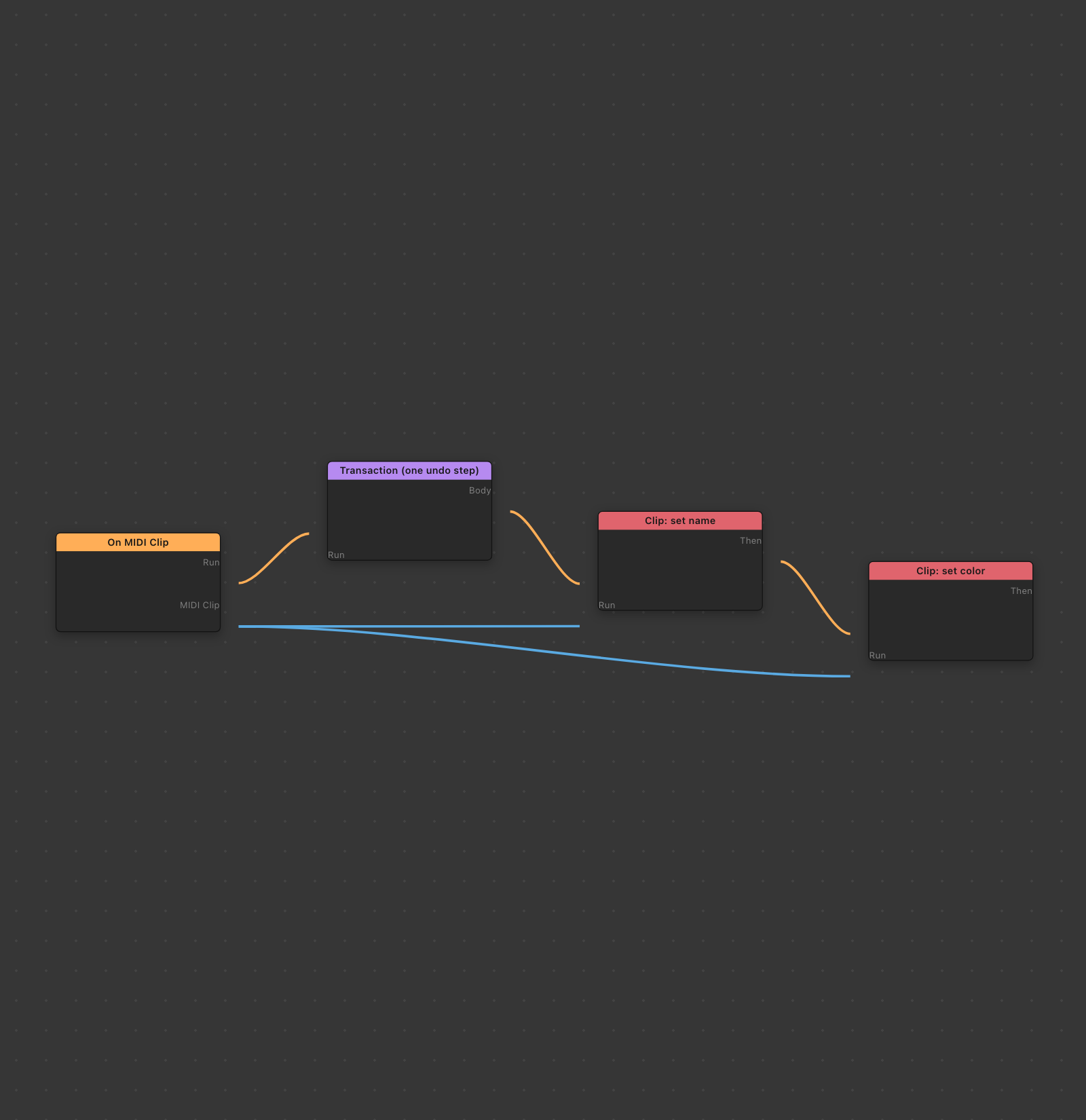 Run wires (control flow) vs data wires (values). Object ports must be wired — settings alone are not enough.
Node settings (params) vs wired inputs
Each node can show settings in the inspector (numbers, text, colors). When a data input port is empty, Patchwright uses the setting value instead — when that port allows literals (number, string, boolean, and similar scalar kinds).
| Use settings for | Use wires for |
|---|---|
| Fixed numbers (semitones, velocity) | The clip or track you clicked |
| Default names and colors | Results from other nodes |
| Enum choices | Lists of notes or tracks |
When a port is wired, its literal control is hidden in the node inspector — the wire is the source of truth. Unwire the port if you need to edit the value inline again.
Object inputs (clip, track, device) must be wired. An unwired object input causes a build error. On the canvas, unwired required ports show a red socket outline. Run ports on steps that should be on your chain show an amber hint when their Run input is missing. Wired data ports show their family color at full strength.
Undo groups (Transaction)
Live undo works step by step. To make several changes one undo in Live, wrap them in a Transaction node:
- Wire trigger Run → Transaction Run
- Wire Transaction Body → first mutating step
- Put all related setters/actions inside the body chain
Example: rename and recolor a clip in one gesture.
Important: Do not put Show Dialog or Progress Dialog inside an undo group. Ask the user first, then start the Transaction with their answers wired in.
Dialogs and progress
| Node | When to use |
|---|---|
| Show Dialog | Ask a question or confirm before changing Live |
| Progress Dialog | Long work with a progress bar (many notes, files, HTTP) |
Design dialog layout with toolbar Designer. The Show Dialog node references that design.
Multiple commands in one project
You can place several trigger nodes in one graph. Each trigger registers a separate menu item in Live:
ExtensionName: On MIDI ClipExtensionName: On MIDI Track
Use this for related tools in one project file. Each trigger still has its own Run chain (they do not share a single Run wire unless you wire them that way — typically each trigger starts its own chain).
Branching (If / Else)
Branch sends Run flow down Then or Else based on a true/false condition.
Important: Run paths do not merge back together. Each input port accepts one incoming Run wire. If both branches need the same final step, duplicate that step on each branch or restructure the graph.
Matching types (why a wire refuses to connect)
Patchwright checks that data types match the Live SDK:
- MidiClip can wire into Clip inputs (more specific → more general)
- Clip cannot wire into MidiClip inputs (wrong direction)
- Exec only connects to exec
- Arrays (note lists, track lists) need array outputs — not single items
- Pitch class (Live
Song.rootNote, 0–11) cannot wire directly into MIDI pitch inputs (NoteDescription.pitch, 0–127). Use Pitch class → MIDI on the canvas, or rely on Settings Base pitch (MIDI) (under the Music section) when that converter's base port is unwired
When a wire is rejected, hover the ports or read the build message — it names the types involved.
See Node Reference — Compatibility.
Async steps and waiting
Some actions talk to Live asynchronously (create track, import file, …). Patchwright handles the wait for you.
- Delay (bounded) — pause up to one hour (milliseconds setting)
- Progress Dialog — for work the user should see
Extensions cannot run forever: no infinite loops, no background servers, no setInterval-style behavior.
Sandbox and safety
| Rule | In plain language |
|---|---|
| HTTPS only | Web nodes cannot call plain http:// URLs |
| Sandbox files | File nodes only read/write inside the extension’s storage folders |
No .. paths |
File paths must stay inside the sandbox |
| Bounded loops | Repeat has an enforced cap (1 000 iterations max); For Each iterates over its array input with no separate numeric limit |
These rules keep extensions safe inside Live.
What Patchwright checks before Live
When you Build, Patchwright validates wiring, types, and forbidden patterns. Errors appear in the toolbar status and build log with messages you can act on — for example “unwired obj input” or “HTTP URL must be HTTPS.”